
ExoHub Architecture
ExoHub Architecture Report: The Layered Data Management Solution
This page provides a comprehensive breakdown of the ExoHub Layered Architecture, a sophisticated data management solution built upon git-annex. This “layered cake” model illustrates how ExoHub transitions from raw, heterogeneous storage into a refined, semantic interface for end-users.
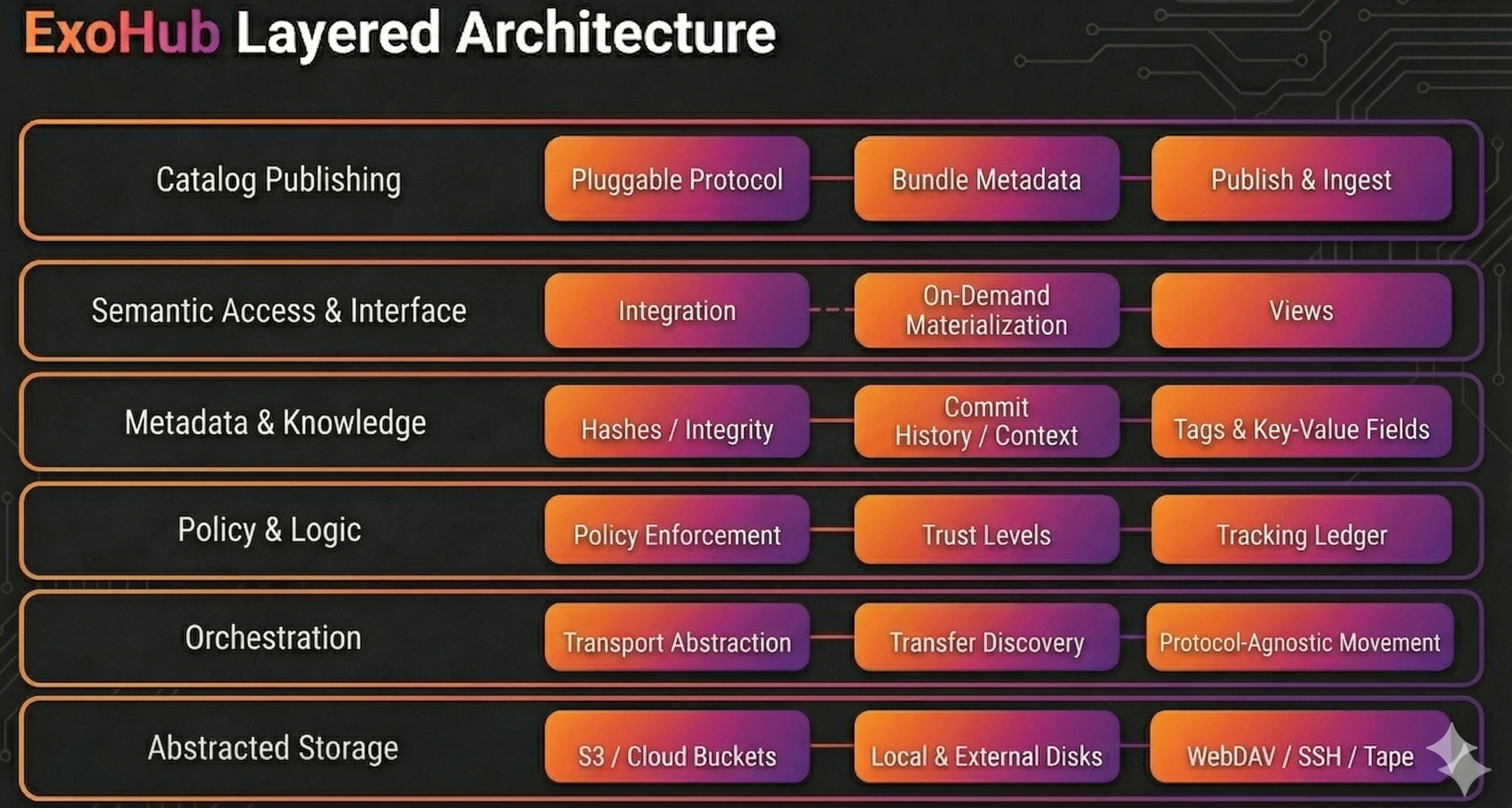
Layer 1: Abstracted Storage (“Foundation”)
This represents the physical or virtual hardware where the bits actually reside. ExoHub treats all storage as a commodity.
S3 / Cloud Buckets
High-scale object storage for durability.
- How it works: ExoHub uses “Special Remotes” to talk to S3 APIs. In Annex mode, the bucket acts as a massive key-value store for hashes.
- Key benefit: Provides virtually infinite scale and geographic redundancy.
Local & External Disks
Physical hardware under direct control.
- How it works: ExoHub tracks the UUID of disks. When a drive is plugged in, the system recognizes it and can begin syncing based on policy.
- Key benefit: Extremely low-latency access and the ability to work in “air-gapped” or offline environments.
WebDAV / SSH / Tape / Google Drive
Legacy and specialized network storage.
- How it works: The system uses hooks to interface with traditional servers or cold-storage systems.
- Key benefit: Maximizes ROI on existing infrastructure by bringing “siloed” data into the unified ExoHub ecosystem, Google Drive with “Export Mode”" to sharing files (PDF, HTML reports, etc…) to non-technical users.
Layer 2: Orchestration (“Engine”)
This layer handles the logistics of data movement, abstracting away the specifics of network protocols and storage types.
Transport Abstraction
A unified communication layer for all storage.
- How it works: It translates high-level commands into protocol-specific actions (e.g.,
S3 PUT,SCP, orRSYNC). - Key benefit: Users interact with a single interface, regardless of the backend storage type.
Transfer Discovery
The path-finding intelligence of ExoHub.
- How it works: When data is requested, the engine “discovers” which remotes are currently reachable and calculates the most efficient (fastest or cheapest) path to retrieve the bits.
- Key benefit: Minimizes latency and egress costs by automatically preferring local or high-speed sources.
Materialization Logic (Annex vs. Export)
The decision engine for how data is formatted on the destination.
- How it works: It manages two distinct modes of storage:
- Annex Mode (Hash-based): Files are stored as content hashes. Ideal for internal integrity and deduplication.
- Export Mode (Tree-based): Files are “materialized” with their original filenames and directory structure.
- Example: A “Backup” remote uses Annex mode for safety, while a “Public Share” remote uses Export mode so non-ExoHub users can read the files.
- Key benefit: Balances technical rigor (hashes) with practical accessibility (names).
Layer 3: Policy & Logic (“Controller”)
This is the governance engine of ExoHub, ensuring that organizational requirements for data safety and redundancy are met automatically.
Policy Enforcement
The ruleset that dictates the “life” of a file.
- How it works: Administrators define policies like
numcopies=3. The system monitors the network and warns (or triggers transfers) if a file drops below this redundancy threshold. - Key benefit: Guarantees data durability and compliance without requiring users to remember to “make a backup.”
Trust Levels
The reliability assessment of the infrastructure.
- How it works: Remotes are categorized as
trusted(highly available),semi-trusted, oruntrusted(temporary/local). - Key benefit: Allows the system to safely manage the deletion of local copies, knowing that a “trusted” copy exists elsewhere.
Tracking Ledger
The global map of the data universe.
- How it works: A specialized, hidden Git branch records the movement of every file hash. It acts as a real-time ledger of which drive, bucket, or server currently holds which pieces of data.
- Key benefit: Provides instant visibility into data location even when storage remotes are offline.
Layer 4: Metadata & Knowledge (“Brain”)
This layer manages the “source of truth” regarding what the data is and where it came from. It merges technical certainty with human context.
Hashes / Integrity
The cryptographic identity of every file.
- How it works: Every file is assigned a unique hash (e.g., SHA256). ExoHub periodically runs integrity checks (
fsck) to ensure the bits on a remote still match the original hash. - Key benefit: Provides an absolute guarantee against “bit rot” and silent data corruption across all storage remotes.
Commit History / Context
The chronological narrative of the dataset.
- How it works: By leveraging the Git commit graph, every change to the data is associated with a user, a timestamp, and a commit message.
- Key benefit: Creates a permanent audit trail, answering the “who, when, and why” for every modification.
Tags & Key-Value Fields
User-defined semantic descriptors.
- How it works: Users attach arbitrary metadata (e.g.,
confidence=high) directly to files. These tags are stored in the git-annex branch and synchronized globally. - Key benefit: Transforms “dead files” into a searchable knowledge base.
Layer 5: Semantic Access & Interface (“Lens”)
This is the primary interface for users and automated pipelines. Its goal is to provide a clean, high-level view of the data that hides the underlying complexity of storage and retrieval protocols.
Integration
The entry point where ExoHub meets the user’s local workspace.
- How it works: It uses Git’s pointer system to represent files in the repository. Even if the data isn’t locally present, the file “exists” as a pointer that ExoHub understands.
- Key benefit: Provides a unified, consistent entry point for all organizational data.
On-Demand Materialization
The mechanism that fetches data only when it is needed.
- How it works: When a user attempts to open or “get” a file, the system identifies the file’s hash, locates it across the network, and downloads it into the local workspace.
- Key benefit: Massive datasets can be managed on devices with limited storage, as only the “working set” of data is ever locally materialized.
Views (Virtual Filesystem)
Dynamic navigation of the repository based on metadata rather than a static folder hierarchy.
- How it works: It uses the
git annex viewengine to transform metadata tags into a temporary directory structure. - Example: A user can instantly “pivot” their view from
/year/project/fileto/tag/status/filewithout moving any data on the disk. - Key benefit: Enables multi-dimensional discovery, allowing different teams to navigate the same data according to their specific needs.
Layer 6: Catalog Publishing (“Bridge”)
This layer connects ExoHub’s data-as-code ecosystem to external data catalogs — systems that make datasets findable, searchable, and accessible to the broader organization. It bridges the gap between versioned data repositories and discovery platforms.
Pluggable Catalog Protocol
A binary-based integration model for external catalogs.
- How it works: A new category of remote (
type: artifactdb, or any custom type) with amodefield (exportorimport) delegates publishing to an external binary (git-annex-remote-<type>-<mode>) that handles S3 upload, metadata packaging, and catalog notification. TheexoCLI contains no catalog-specific logic. - Key benefit: Anyone can integrate a new catalog by implementing a single binary — no changes to the CLI needed.
Bundle Metadata
Structured JSON artifacts generated by exo bundle that describe a repository at a specific revision.
- How it works: The bundle includes per-file metadata (path, size, storage locations), per-commit history (author, date, message), and a manifest. This metadata is the input for catalog indexing.
- Key benefit: Catalogs receive a complete, self-contained snapshot of the dataset’s structure and history, without needing access to the git repository itself.
Publish & Ingest
The automated pipeline from repository to catalog index.
- How it works:
exo sync --with <catalog-remote>uploads bundle metadata to S3, then notifies the catalog API. The catalog reads the metadata from S3 and indexes it asynchronously. Permissions from.exohub/permissionsare propagated to control access in the catalog. - Key benefit: Publishing is a single command that integrates into existing sync workflows. Release-only publishing (
publish_on: tag) ensures only tagged versions are indexed.
See Catalog Publishing for the full architectural details and ArtifactDB/ArtifactDB integration.