Configuration
Pinard reads two kinds of config: machine-level secrets in ~/.config/pinard/, and
per-vignoble files in the vignoble directory.
No built-in defaults. All hostnames, NATS URLs, and service endpoints must be set explicitly — Pinard ships without any pre-configured hosts. Copy the example files from the repo root (
credentials.example.yaml,vignes.example.yaml) and fill in your values.
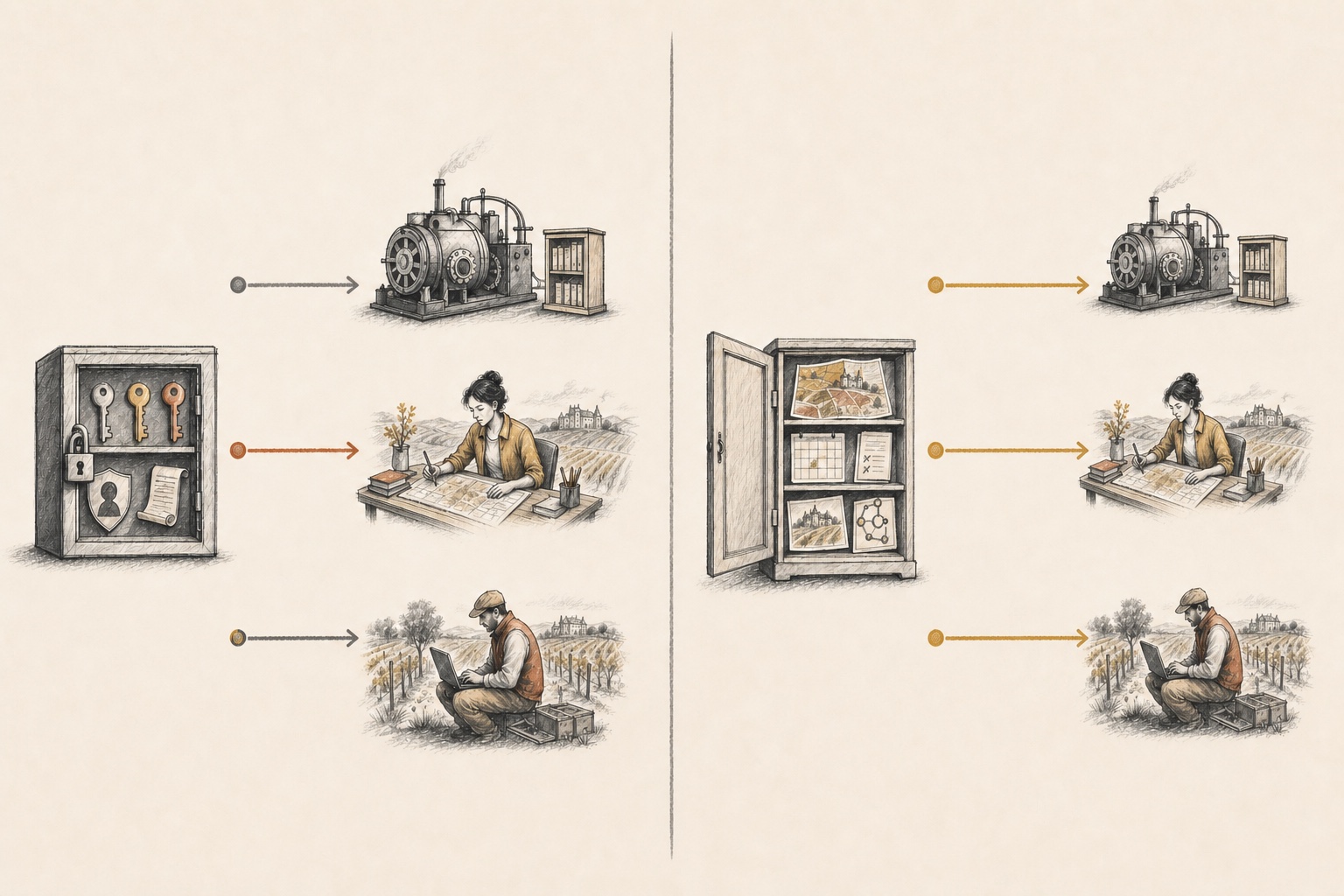 H · Machine scope
V · Vignoble config → every role
Daemon · services & identity
O · Conductor · owner token only
B · Vendangeur · bot identity
Daemon
Conductor
Vendangeur
H · Machine scope
V · Vignoble config → every role
Daemon · services & identity
O · Conductor · owner token only
B · Vendangeur · bot identity
Daemon
Conductor
Vendangeur- HMachine scope — credentials, environment secrets, NATS, GitLab, and optional services.
- VVignoble scope — vignes, models, schedules, parcelles, and role policies.
- OOwner token — exported to the conductor only; never to workers.
- BBot/service identity — used for mechanical GitLab work and worker operations.
~/.config/pinard/credentials.yaml
Secrets and identity for GitLab and NATS. Tokens/passwords are referenced by env var
(*_env) rather than stored inline.
gitlab:
  host: gitlab.com
  user: bot-user
  token_env: PINARD_GITLAB_TOKEN
  owner_token_env: PINARD_OWNER_GITLAB_TOKEN   # optional: human operator's PAT (see Owner Gate)
  ssh_key: ~/.ssh/pinard_id_ed25519
  git_name: Pinard
  git_email: pinard-bot@example.com

# GitHub identity — required when any vigne uses provider: github
github:
  host: github.com                   # default; use your GHE hostname for GitHub Enterprise
  user: pinard-bot                   # GitHub username of the service account
  token_env: PINARD_GITHUB_TOKEN     # env var holding a fine-grained PAT
  git_name: Pinard
  git_email: pinard-bot@users.noreply.github.com

nats:
  url: wss://nats.example.com
  user: lelongs
  password_env: PINARD_NATS_PASSWORD
The github: block is only required when at least one vigne uses provider: github (see Pressoir — git host below). See GitHub Setup for the full onboarding guide including fine-grained PAT permissions.
owner_token_env is the env var holding the human operator’s GitLab personal access
token (PAT). It is separate from the bot token (token_env) and is used in two places:
- Owner gate — when the conductor’s
spawn_agenttool assigns an issue, it uses the owner token so the assignment note is authored by you (not the bot), which Pinard then recognises as owner approval. See The SWE Process — Owner Gate. aoc env-exports --role conductor— the owner token is emitted only for the conductor role and is never passed to vendangeur workers, preventing PAT leakage to LLM-driven processes.
The nats.user value is used as the vignoble owner for the owner gate. Set it to your
GitLab username (not the bot’s username).
The referenced env vars can live in your shell or in ~/.config/pinard/env, which the
detached daemon sources on start.
Git authorship. Commits are authored as you (
GIT_AUTHOR_*from your global git config — you directed the work) but committed by the service account (GIT_COMMITTER_*fromcredentials.yaml— it pushed).
The optional webterm: block configures the Web Terminal.
Buddy Capsule (optional)
The Buddy Capsule protocol is gated behind a build tag and requires
an external Mnemosyne service. If your aoc binary was built with -tags capsule, set
the Mnemosyne base URL in ~/.config/pinard/env (sourced by the daemon at start):
# ~/.config/pinard/env
PINARD_MNEMOSYNE_URL=https://mnemosyne.example.com
There is no default — capsule commands fail clearly if this variable is unset.
Engram cloud replication (optional)
Each vignoble keeps a local Engram memory store at .engram/engram.db. To also replicate memories to the cloud, add an engram: block and set the bearer token in the referenced env var:
# credentials.yaml
engram:
  server: https://engram.example.com
  cloud_token_env: ENGRAM_CLOUD_TOKEN   # env var holding the bearer token
  # cloud_token: <literal>              # or: a literal value (not recommended)
Then export the token alongside your other secrets:
export ENGRAM_CLOUD_TOKEN="your-token"
Omit the engram: block entirely to keep memory local-only — it is off by default.
Once configured, replication happens across several sync points:
| Sync point | When | Owned by |
|---|---|---|
| Startup flush | Every agent start | Launcher (bin/pinard) |
| Autosync | On each mem_save call | Engram MCP server (ENGRAM_CLOUD_AUTOSYNC=1) |
| Periodic flush | Every 5 min (configurable) | Daemon (on the Pinard host); standalone HPC worker’s background loop |
| Exit flush | When the agent exits | Launcher |
On the Pinard host the daemon owns two things:
- The always-on
engram serveprocess (so all agents — régisseur, maître, vendangeur — share a single server rather than each racing to start their own).aoc env-exportsemits the authoritativeENGRAM_PORTandENGRAM_URLfor the vignoble (computed viaengram.PortForVignoble), overriding any stale inherited value so agents always attach to the right serve. - The periodic cloud drain (
EngramSyncer, scope:<vignoble>/.engram).
The launcher fails fast if the daemon-owned Engram serve is not healthy when a vignoble agent starts — you will see:
pinard: FATAL: engram serve at http://127.0.0.1:<port> is not healthy — refusing to start with broken memory.
  The per-vignoble serve is owned by 'aoc daemon'. Check it is running:
    cd "<vignoble>" && aoc daemon status   # then: aoc daemon start
This is intentional: silent dead mem_* calls are worse than a clear startup failure. Ensure aoc daemon start has been run for the vignoble before launching agents.
Standalone / HPC workers (pinard --vignoble-name …) have no daemon present and receive no ENGRAM_URL from the launcher. Instead, gentle-engram (the MCP backend) self-serves its own Engram instance on the computed port when ENGRAM_URL is unset. The _wait_for_engram gate is skipped entirely for standalone workers.
The launcher’s periodic sync loop runs only for standalone workers. Override the interval via
ENGRAM_SYNC_INTERVAL (seconds) in ~/.config/pinard/env.
Enrollment and sync failures are logged as warnings but are never fatal — the local store remains the source of truth and autosync retries in the background.
Startup health gate
Before launching pi, the pinard launcher waits for the daemon-owned engram serve to
be healthy (up to 15 seconds). If the serve does not come up, the launcher aborts with
a clear error rather than starting with broken memory:
pinard: FATAL: engram serve at http://127.0.0.1:7563 is not healthy — refusing to start
  Check: cd <vignoble> && aoc daemon status   # then: aoc daemon start
This guard applies only to vignoble-attached agents. Standalone / remote workers
(pinard --vignoble-name …) have no daemon to own a serve; the launcher skips the gate
and lets gentle-engram self-serve on its own computed port.
aoc env-exports now emits authoritative ENGRAM_PORT and ENGRAM_URL for the vignoble
(evaluated by the launcher via eval), ensuring all agent roles point at the same serve
even if an inherited ENGRAM_PORT from a different vignoble is in scope.
Role-scoped engram projects
Memory is partitioned by agent role to keep workstreams cleanly separated in the cloud:
| Agent | Engram project |
|---|---|
| Régisseur | vignoble-<name> (full prefixed vignoble name) |
| Maître | parcelle-<name> |
| Vendangeur | <vigne> (bare project name, shared across vignobles) |
The daemon automatically enrolls and syncs each project that has written at least one memory (dynamic multi-project enrollment — no per-project config is needed).
Engram sync status
Run aoc status to see the memory sync state alongside your MRs and workers:
🧠 Engram sync:
  exohub             total:512   unacked:0     last-sync:3m ago      ✓ synced
  myproject          total:88    unacked:4     last-sync:just now    ⚠ 4 pending push
  offline-vigne      total:23    · local-only
The same information appears as an Engram panel in aoc dashboard (refreshes every 10 s).
vignes.yaml
The per-vignoble registry: defaults, models, and the vignes themselves.
gitlab_host: gitlab.com
gitlab_group: exohub
auto_merge: false             # optional; off by default (humans merge). Override per-vigne.
auto_review: true             # optional; on by default (maître reviews every green MR). Override per-vigne.

models:
  # provider / api: optional. Default is the Anthropic proxy (no change for
  # existing setups). Set provider: openai or provider: deepseek to drive pi
  # against that provider directly — see "Custom LLM provider" below.
  conductor:
    id: claude-opus-4-6
  worker:
    id: claude-sonnet-4-6

vignes:
  exo-cli:
    path: ~/exo-cli
    repo: exohub/exo-cli
    monitor_post_merge: true
    model:
      id: claude-opus-4-6     # override the worker model for this vigne
Per-vigne flags
| Flag | Effect |
|---|---|
path | Local checkout path for the repo |
repo | Project path (group/name for GitLab; owner/name for GitHub) |
default_branch | Target branch for PRs/MRs; defaults to main |
auto_merge | Opt-in: auto-merge when approved, CI green, no unresolved threads. Off by default |
auto_review | Opt-out: the owning maître reviews every green non-draft MR and posts a signed comment. On by default. Approval remains a human/forge responsibility. |
monitor_post_merge | After merge, watch the main branch + any bump/tag pipeline and notify on pass/fail |
model.id | Override the worker model for this vigne |
pressoir | Per-vigne pressoir override (see below) |
Edit vignes.yaml directly, or use aoc add vigne and aoc config set. The daemon
hot-reloads on change.
models fields
| Field | Type | Default | Description |
|---|---|---|---|
provider | string | proxy | LLM provider: proxy (Anthropic proxy), openai, deepseek, or any pi-supported provider |
api | string | provider-dependent | pi provider API type. Defaults to anthropic-messages for proxy, openai-responses for all others |
conductor.id | string | opus tier | Concrete model ID for the conductor/régisseur |
worker.id | string | sonnet tier | Default model ID for vendangeur workers |
See Custom LLM provider below for a full walkthrough.
Custom LLM provider (OpenAI / DeepSeek)
Pinard’s underlying agent (pi) is model-agnostic. By default Pinard launches with
--provider proxy, routing through your Anthropic proxy. To drive OpenAI or DeepSeek
directly, set models.provider in vignes.yaml:
# OpenAI
models:
  provider: openai           # passes --provider openai to pi
  # api: openai-responses    # default for non-proxy providers; explicit override optional
  conductor:
    id: gpt-4o
  worker:
    id: gpt-4o-mini
# DeepSeek
models:
  provider: deepseek
  conductor:
    id: deepseek-reasoner
  worker:
    id: deepseek-chat
Then set the provider’s API key in ~/.config/pinard/env:
# ~/.config/pinard/env
OPENAI_API_KEY=sk-...
# or
# DEEPSEEK_API_KEY=...
Pinard’s aoc env-exports passes these through to pi, which picks them up via
its standard env-var resolution for each provider.
Backward-compatible: existing vignobles with no models.provider field are
unchanged — they continue to use provider: proxy and the Anthropic proxy path.
Pressoir — git host
The pressoir abstraction is Pinard’s git-host seam. By default every vigne uses
GitLab. To use GitHub — or a GitHub Enterprise instance — configure the pressoir:
block at the vignoble level, or override it per vigne.
PressoirConfig fields
| Field | Type | Default | Description |
|---|---|---|---|
provider | gitlab | github | gitlab | Which git host adapter to use |
host | string | provider default | API hostname override (github.com or a GHE host; Pinard maps to the correct API base) |
org | string | — | GitHub org or GitLab group (used when creating repos or resolving references) |
token_env | string | — | Env var holding the PAT/token for this pressoir scope |
Precedence
Pinard resolves the effective pressoir config using this priority order:
- Per-vigne
pressoir:— apressoir:block inside avignes:entry - Vignoble-level
pressoir:— apressoir:block at the top ofvignes.yaml - Default —
provider: gitlab, inheritinggitlab_hostandgitlab_group
Examples
Vignoble-level GitHub default
All vignes in this vignoble use GitHub unless overridden:
# vignes.yaml
pressoir:
  provider: github
  org: my-github-org

vignes:
  my-api:
    path: ~/my-api
    repo: my-github-org/my-api
    default_branch: main
Mixed vignoble (GitLab default, one GitHub vigne)
# vignes.yaml
gitlab_host: gitlab.example.com
gitlab_group: mygroup

vignes:
  gl-service:                     # uses the default gitlab pressoir
    path: ~/gl-service
    repo: mygroup/gl-service

  gh-lib:                         # overrides to github for this vigne only
    path: ~/gh-lib
    repo: my-org/gh-lib
    default_branch: main
    pressoir:
      provider: github
      org: my-org
GitHub Enterprise
# vignes.yaml
pressoir:
  provider: github
  host: github.example.com        # GHE hostname; Pinard maps to https://github.example.com/api/v3
  org: my-enterprise-org

vignes:
  enterprise-repo:
    path: ~/enterprise-repo
    repo: my-enterprise-org/enterprise-repo
    default_branch: main
Host mapping. Users always set
hostto the git hostname —github.comor a GHE hostname — not the API URL. Pinard mapsgithub.com → api.github.comand<ghe-host> → https://<ghe-host>/api/v3internally.
See GitHub Setup for the full onboarding guide (PAT permissions, branch protection, auto-merge setup, and capability differences vs GitLab).
schedules.yaml
Cron-based agent spawns. Managed with aoc add schedule / aoc unschedule, or edited
directly. See Scheduling.
schedules:
  nightly-sync:
    project: mnemosyne
    cron: "0 2 * * *"
    prompt: "Run the sync task and open an MR if anything changed"
    once: false
Permissions
Pinard uses Pi’s permission system, layered per role:
| Path | Applies to | Policy |
|---|---|---|
<vignoble>/.pi/agent/pi-permissions.jsonc | Conductor | bash: allow all |
<worktree>/.pi/agent/pi-permissions.jsonc | Workers | bash: allow, external directory access: deny |
<vignoble>/vignes/<project>/.pi/agent/pi-permissions.jsonc | Per-vigne override | symlinked into the worktree at spawn |
Memory service (Helm) — wiki & multi-vignoble
Operators deploying the memory service pod via the pinard Helm chart can configure
wiki repo access and multi-vignoble discovery:
# values.yaml (memory section)
memory:
  ssh:
    vault:
      sshKey: ""        # Vault property name for the SSH private key, e.g. ssh_gitlab_com
                        # When set, an ExternalSecret + SSH volume are created automatically.
  wikiRepos:
    pinardWiki: ""      # SSH URL for the global pinard-wiki repo,
                        # e.g. git@ssh.gitlab.com:your-group/pinard-wiki.git
    cloneDir: /data/repos  # Parent dir for wiki repo clones inside the pod
    sshHost: ""         # SSH hostname for vignoble git clones (sets GITLAB_SSH_HOST in the pod).
                        # Required when your GitLab SSH endpoint differs from its API hostname
                        # (e.g. "ssh.gitlab.com"). Must be set explicitly in custom-<env>.yaml.
    sshKnownHosts: ""   # known_hosts entry for sshHost, e.g.:
                        #   "ssh.gitlab.example.com ssh-ed25519 AAAA..."
                        # Required when sshHost is set — the init-container writes this
                        # into ~/.ssh/known_hosts before cloning.
    gitEmail: "pinard@example.com"  # git author/committer email used by wiki clone jobs
  vignes:
    data: ""            # Raw vignes.yaml content for the ScopeRollupEngine.
                        # Superseded when VIGNOBLES_BASE_DIR is set (see below).
  config:
    groupIds: ""        # Comma-separated group_ids to ingest (optional).
                        # Leave empty (default) for full auto-discovery from cloud_mutations
                        # (postgres source) or vignes.yaml (http source).
                        # Set to restrict ingest to a subset during debugging or testing.
    embeddingUrl: "https://embeddings.example.com"   # embedding service URL (was rosettaUrl)
    llmTokenUrl: ""     # pour-URL for MEMORY_LLM_AUTH=url (single token endpoint)
    llmTokenUrls: []    # pour-URLs for round-robin token fetching; overrides llmTokenUrl
  recall:
    enabled: true       # Deploy the memory-recall Go binary as a separate workload.
    resources: {}       # Pod resource requests/limits (cpu/memory).
  rollup:
    enabled: true       # Deploy the memory-rollup job on the configured schedule.
    schedule: "0 * * * *"  # Cron expression for the rollup job (default: hourly).
    resources: {}       # Pod resource requests/limits.
With ssh.vault.sshKey set, the chart provisions:
- An
ExternalSecretpulling the private key from Vault. - An SSH
ConfigMap(host keys + per-host config) and an init-container that clones all vignoble repos discovered via thepinard-vignoblesNATS KV bucket to<cloneDir>/vignobles/vignoble-<name>/. - If
wikiRepos.pinardWikiis non-empty, the globalpinard-wikirepo is also cloned to<cloneDir>/pinard-wiki/.
Environment variables for the memory service
These are set by the Helm chart and control the ingester/curator/rollup engine at runtime:
| Variable | Purpose |
|---|---|
VIGNOBLES_BASE_DIR | Required. Parent dir of multiple vignoble clones. The memory service fails fast at startup if this is unset or the path does not exist. The rollup engine and wiki curator iterate all vignoble-<name>/ subdirs automatically. |
GLOBAL_WIKI_ROOT | Filesystem path to the cloned global pinard-wiki repo. Used by the curator and inbound sync. |
MEMORY_GROUP_IDS | Comma-separated group IDs to ingest. Optional — when unset the ingester auto-discovers all groups from the postgres cloud_mutations table (or vignes.yaml for the http source). Set to a subset only when debugging or restricting scope temporarily. |
EMBEDDING_URL | Base URL for the vector embedding service (default: https://embeddings.example.com). Replaces the deprecated ROSETTA_URL. |
ROSETTA_URL | Deprecated alias for EMBEDDING_URL. Honored for one release cycle with a deprecation log line; switch to EMBEDDING_URL. |
MEMORY_TOKEN_URL | Single pour-URL for MEMORY_LLM_AUTH=url token fetching. |
MEMORY_TOKEN_URLS | Comma-separated pour-URLs for round-robin token fetching; overrides MEMORY_TOKEN_URL when set. Improves reliability when multiple token endpoints are available. |
PINARD_ONTOLOGY_DIRS | Colon-separated directories to scan for domain ontology YAML files (*.yaml/*.yml/*.json). Combined with <vignoble>/pinard/ontology/*.yaml auto-discovery. Missing directories are non-fatal (logged warning). |
All variables are derived from Helm values by the chart.
Vignoble layout
For reference, aoc init produces:
vignoble-<name>/
  vignes.yaml          # vigne registry + models
  schedules.yaml       # scheduled spawns
  PINARD.md            # conductor system prompt (symlink to the Pinard repo)
  changes/             # cross-repo proposals (openspec changes)
  parcelles/           # per-parcelle state and run journals
  vignes/<name>/       # per-vigne VIGNE.md and permission overrides
  wiki/                # OKF wiki bundle (seeded by daemon on first start)
  .state/              # watcher/scheduler state, daemon.pid (gitignored)
  logs/                # daemon/conductor/event logs (gitignored)
  .pi/agent/           # conductor permissions