Memory & Recall
Agents are stateless across sessions. Without memory, every crash, every new session, and every reaped worker throws away hard-won operational knowledge — failure patterns, recovery recipes, threshold decisions — and a human re-teaches the same lessons on every run. Memory is how a Pinard fleet learns and improves over time, and it is the third pillar alongside the semi-deterministic loop and the agents themselves.
Pinard’s memory is local-first, curated, and portable:
- local-first — the store of record is local; cloud replication is best-effort and never blocks an agent;
- curated — signal over noise: agents write distilled observations (decisions, bugfixes, discoveries), not raw transcripts;
- portable — memory can be versioned and shipped with an agent (see the layered architecture).
What runs today vs. what’s designed. This page covers the shipped memory system (engram + wiki bundle). The richer, layered architecture that builds on it — SurrealDB, semantic recall, a knowledge graph, ontologies, the self-curating wiki — is documented in The Layered Memory Architecture and the pages that follow, each marked with its status (✅ shipped · 🔭 designed · 🧪 spike). The wiki curator and ontology gardener are ✅ shipped as of v0.18.
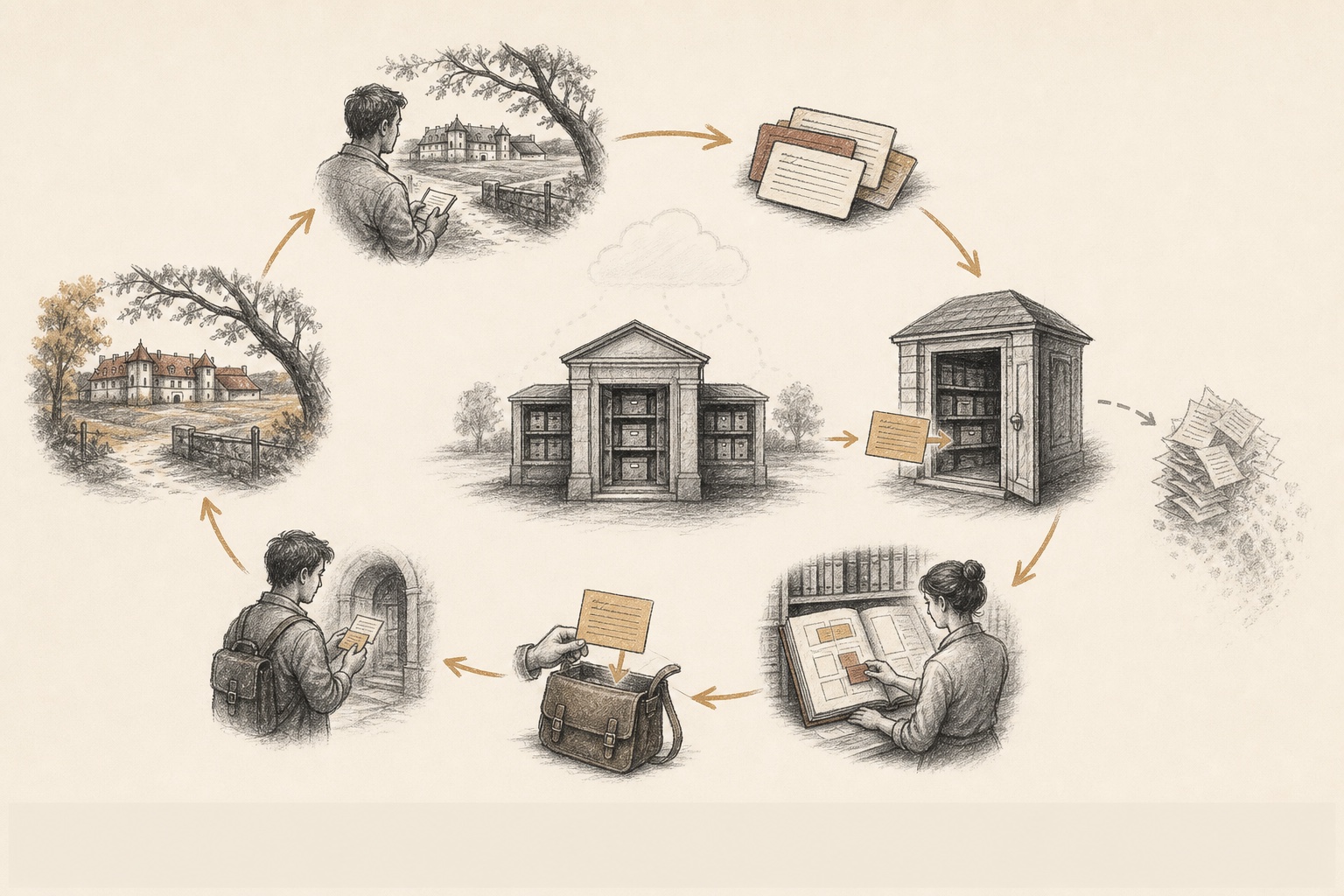 1 · Observe
2 · Distill
3 · Store & curate
4 · Inject boot index
5 · Recall / fetch
6 · Apply & improve
Raw transcripts fade
1 · Observe
2 · Distill
3 · Store & curate
4 · Inject boot index
5 · Recall / fetch
6 · Apply & improve
Raw transcripts fade- 1Observe a decision, failure pattern, fix, or discovery.
- 2Distill the reusable knowledge; do not save the transcript.
- 3Store and curate locally, with cloud sync remaining best-effort.
- 4Inject an index before a new worker's first task.
- 5Recall or fetch exact detail only when needed.
- 6Apply and improve the next run, then capture new learning.
What runs today
Memory services (Go native binaries)
The memory layer is implemented as three Go binaries, deployed together inside the
pinard-solo or pinard-backend images (or as standalone processes on any host):
| Binary | Role |
|---|---|
memory-ingester | Polls engram for curated observations, maps them to the pinard ontology, and upserts records into SurrealDB. Also subscribes to NATS for MR-sync and rule/episode events. |
memory-recall | Answers pinard.<vignoble>.recall NATS requests with knowledge from SurrealDB — semantic vector search (via Rosetta), lexical lookup, and graph traversal. Fail-open with a ~3 s timeout. |
memory-rollup | Compacts and summarizes accumulated episodic records to keep the store manageable. |
All three are Go binaries with no Python runtime dependency. They ship natively for
Linux (inside pinard-solo/pinard-backend) and build for any platform where Go is
available.
See The Layered Memory Architecture for the full
SurrealDB schema and layer semantics.
The wiki bundle
From Pinard v0.18 onward, the daemon seeds a wiki/ directory inside the vignoble
on first start — an OKF (Open Knowledge Format) bundle that the memory service
then populates:
vignoble-<name>/
  wiki/
    index.md          # root index
    INSTRUCTIONS.md   # type vocabulary, folder conventions, contribution rules
    log.md            # change history
The scaffold is committed to the vignoble repo automatically. Subsequent content comes from the wiki curator running in the memory service pod, not from the daemon directly.
The engram write path
Every vignoble has a memory backend called engram:
- One store per vignoble — a local database at
<vignoble>/.engram, holding many projects. - A daemon-owned serve —
aoc daemonruns oneengram serveper vignoble on a deterministic port; every agent attaches to it viaENGRAM_URL. Standalone remote workers, which have no daemon, run their own serve. The serve outlives daemon restarts so recall never gaps. - Cloud replication — the daemon drains local writes to a central backend,
best-effort, so memory survives host loss and can be shared. A 🧠 indicator in
the status line and
mem_doctorreport sync health.
Role-scoped projects
Memory is separated by the role of the agent writing it, so a régisseur’s estate notes don’t drown a worker’s repo-specific knowledge:
| Role | Memory project |
|---|---|
| Régisseur | vignoble-<name> — estate-wide |
| Maître | parcelle-<name> — one workstream |
| Vendangeur | <vigne> — the bare repository name |
A useful consequence: because a vendangeur’s project is just the repository name, the same repo worked in two different vignobles shares one memory project — a feature, not a leak.
The memory protocol — what agents do
Agents follow a simple protocol that makes the fleet compound its knowledge.
Recalling memory interactively (humans)
Operators can query and inject curated knowledge directly into an agent session
using the /recall slash command, available in both the conductor and vendangeur
interfaces:
/recall <query>                              # query mode — search across ALL curated scopes + Engram
/recall fetch wiki:<path>                    # fetch mode — retrieve full body of one wiki page
/recall fetch entity:<id>                   # fetch mode — retrieve full body of one entity
/recall --scope <name> <query>              # narrow to a specific SurrealDB scope
/recall --global <query>                    # query only the __global__ (cross-vignoble) scope
/recall --type <t> <query>                  # filter to a specific type (see type filter table below)
/lesson <text>                               # pin a durable rule/fact to shared memory
/lesson --edit                               # interactive picker — choose a lesson to edit
/lesson --edit --entity=<id>                # edit a specific lesson by entity id
/lesson --replace --entity=<id> <text>      # replace the text of a specific lesson
/forget --entity=<id>                       # delete a pinned lesson (confirmation required)
Pass --type <t> to narrow the fan-out to a specific result type:
--type value | What it shows |
|---|---|
lesson | Pinned lessons only (provenance = lesson) |
teaching | Teaching-episode extractions only |
decision / artifact / diagnosis | SurrealDB entities of that role |
wiki | Wiki pages only |
engram | Engram local observations only (skips SurrealDB) |
Without --type, /recall fans out to both sources across all curated scopes:
- Curated knowledge — SurrealDB wiki pages and typed entities searched across every vigne scope, the vignoble-wide scope, and the global scope simultaneously.
- Engram local observations — keyword/BM25 search in the vignoble’s Engram store.
Use --scope <name> to narrow to one SurrealDB scope; --global limits to the
__global__ cross-vignoble scope only. Without either flag, all scopes are queried.
In query mode you get an interactive pick-list of hits with source labels and refs; select one or more entries to inject their full content into the current session context. In fetch mode the full body of the referenced page or entity is injected directly.
This is the human parallel to the recall agent tool described below.
/lesson and /forget
Pin, edit, or delete durable rules and facts in shared memory:
/lesson always use a fix: or feat: commit prefix
/lesson --edit                              # pick an existing lesson and edit it interactively
/lesson --replace --entity=<id> <new text>  # overwrite a specific lesson
/forget --entity=<id>                       # delete a lesson (confirmation required)
A lesson is stored in the SurrealDB curated layer (not just Engram), injected into the
current session immediately, and surfaces in the boot manifest for future agents. Use
/lesson for high-value, long-lived facts — commit conventions, hard-won constraints,
canonical URLs. Entity ids appear in /recall hit labels and can be copied directly
into --edit --entity= or --replace --entity= flags.
See Teaching & Curation for the full teaching
menu including /teaching mode.
Reading memory (agents)
recall is the primary read tool for agents. It has two modes:
| Mode | How to invoke | What it does |
|---|---|---|
| Query mode | recall(query="...") | Fans out across all curated SurrealDB scopes (every vigne + vignoble + global) plus local Engram (keyword/BM25); returns source-labelled hits with inline refs. Default. Call when stuck, on failure, or starting a new subtask. |
| Fetch mode | recall(fetch="wiki:<path>") or recall(fetch="entity:<id>") | Exact drill-down: returns the full body of one wiki page or entity. Use when you have a ref from a boot manifest or from a recall hit. |
The two modes are mutually exclusive in one call.
Hit labels
Every hit returned by recall (and by /recall) carries a consistent label:
| Label | Meaning |
|---|---|
[wiki · <scope>] | Wiki page from the SurrealDB scope <scope> |
[lesson · <scope>] | Pinned lesson entity |
[teaching · <scope>] | Entity extracted from a teaching episode |
[entity:<role> · <scope>] | Typed entity (role = artifact, gotcha, etc.) from SurrealDB scope <scope> |
[decision:mr · <scope>] | Decision/artifact/diagnosis entity extracted from an MR description + closing issues (Pass 1). See MR knowledge ingestion. |
[decision:mr-review · <scope>] | Net-new entity extracted from the MR’s review notes (Pass 2); artifact:mr-review and diagnosis:mr-review also exist. |
[engram:<type> · <engram-scope>] | Engram observation of type <type>; <engram-scope> is Engram’s own project or personal |
Curated hits also show a ref inline — e.g. (ref: wiki:ops/singularity) or
(ref: entity:entity:abc123). Copy this ref and pass it to recall(fetch=<ref>) or
/recall fetch <ref> to drill into the full body.
No-result behavior
When no candidate is close enough to the query (all vector distances exceed the relevance threshold), recall returns nothing rather than surfacing the nearest-but-irrelevant hit. If you expect a result and get nothing, try a narrower or more specific query, or switch to fetch mode with a known ref.
SurrealDB scope taxonomy
The curated knowledge base is split across independent scope databases:
| Scope | What it holds | Who writes |
|---|---|---|
<vigne> (e.g. genomics-workers) | Per-repo worker knowledge — entities and wiki pages accumulated on that project | Workers spawned for that vigne |
vignoble-<name> | Vignoble-wide rollup — promoted lessons, régisseur pins, cross-vigne facts | /lesson from the régisseur; the rollup promoter |
<name> (bare vignoble name) | Régisseur’s own Engram store (project=<name>) — régisseur’s raw observations | mem_save from the conductor |
__global__ | Cross-vignoble shared knowledge — reusable patterns, canonical facts | Manual or cross-vignoble promotion |
By default, recall (both the tool and /recall) fans out across all of these —
every vigne scope, vignoble-<name>, the bare vignoble name, and __global__ — so
results from worker knowledge bases are always visible to the régisseur without any
scope flag.
| Tool | What it searches | When to use |
|---|---|---|
recall | All SurrealDB scopes + Engram (query mode) or exact ref (fetch mode) | Default read tool |
mem_search | Local Engram observations only (semantic/natural-language) | Follow-up when recall’s Engram leg is thin and the query is conceptual. |
mem_context | Local Engram (recent + project context) | Session warm-up. |
Writing memory
mem_save— capture a decision, bugfix, discovery, or convention the moment it happens (with a type and an optional stabletopic_key).mem_session_summary— write a structured summary at the end of a session so the next agent inherits the context.mem_update— evolve a decision in place via itstopic_keyinstead of piling up contradictions.
Supporting tools cover housekeeping and analysis: mem_timeline, mem_get_observation,
mem_stats, mem_doctor, and the relation-judgment tools mem_judge / mem_compare
(used by the promotion engine described in Scope & Promotion).
Boot injection at spawn
When a vendangeur starts, before the first task, the babysitter fetches a compact knowledge index for the agent’s scope from the memory service and injects it as context. This means an agent inheriting a large vignoble can start a subtask already aware of relevant decisions, gotchas, and wiki pages — without any manual recall call.
The boot manifest is a scope-grouped index, not a dump of full content:
--- Knowledge index for your scope/task (use recall fetch=<ref> to expand) ---

[exo-cli]
  decision · Always use fix:/feat: prefix · Enforced by CI linter · wiki:exo-cli/commit-rules
  gotcha · Staging DB resets nightly · Never rely on its state across days · entity:gotcha:123

[vignoble-exohub]
  wiki · Cross-repo caching strategy · Shared guidance from the cuvee · wiki:_shared/caching

--- End of knowledge index ---
Each line is type · title · one-line summary · ref. The agent drills into any entry
with recall(fetch=<ref>) to get the full body. This two-step design keeps the boot
context small regardless of how much knowledge the vignoble has accumulated.
Boot injection is fail-open — if the memory service is unavailable or times out (default: 6 seconds), the agent starts normally without a boot context.
Operating memory
- The per-vignoble serve is owned and supervised by the daemon; it is started
detached and left running across daemon restarts, so
mem_*has no gap. An explicitaoc daemon stoptears it down; arestartor crash leaves it up. - Check health with the 🧠 status-line indicator, the engram section of
aoc status,mem_doctor, andaoc memory-status— the latter gives a unified three-section view of Engram replication, SurrealDB ingestion, and wiki curation health (see CLI Reference). - Cloud sync is best-effort — if replication is down, the local store is still the source of truth and agents keep working.
Next
- The Layered Memory Architecture — the full vision.
- The Ontology — how knowledge is typed and made portable.
- Teaching & Curation —
/lesson,/teaching, the wiki, and promotion.