Orchestration & Parcelles
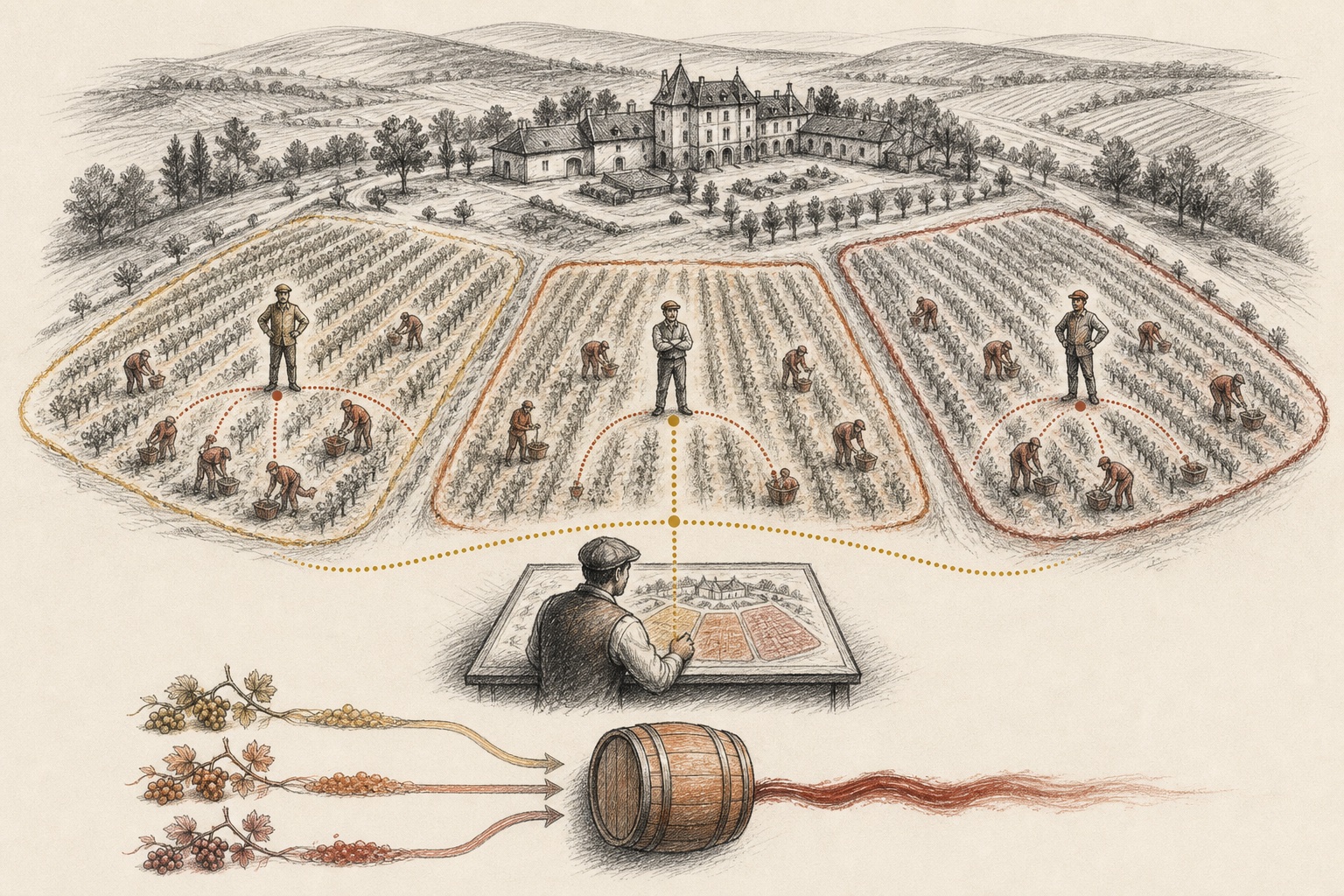
Pinard organizes work in three tiers and groups it into parcelles. This page explains how the conductors relate and how a workstream persists over time.
Three tiers
One vignoble = one régisseur + N maîtres (one per active parcelle) + M vendangeurs (workers).
 Vignoble
Parcelle
Maître
Vendangeurs
Régisseur
Cuvée branch
Vignoble
Parcelle
Maître
Vendangeurs
Régisseur
Cuvée branch
main- Régisseur — vignoble-wide overview and general lane.
- Maître — one autonomous conductor per active parcelle.
- Vendangeurs — task workers scoped to their parcelle.
- Parcelle — durable workstream identity, context, and run journals.
- Cuvée branch →
main— several worker branches converge before one final MR.
Régisseur
The estate manager. It runs in the conductor tmux session’s [régisseur] window and
owns the general lane — the vignoble overview plus anything unparceled, untriaged, or
vignoble-level. It does not consume the per-parcelle event firehose; it works from a
KV overview (list_parcelles) plus the notifications, issues, and schedules streams. Its
session persists at .state/regisseur-session.jsonl.
Maître
A parcelle-scoped conductor — one per parcelle. It consumes only its parcelle’s agent
events, runs a conductor-grade model, and keeps a persistent, resumable session at
parcelles/<name>/session.jsonl. A maître always runs autonomously on its parcelle’s
events — its durable JetStream consumer ingests them and steers the session whether or not
you are watching — and attaching to its window (via ctrl+b select-window, aoc maitre attach, or /parcelle) lets you watch and steer it interactively. There is no mode switch
keyed on attach state: autonomy is always on; attaching simply adds your own input alongside
the autonomous event stream.
Session memory
Cross-session recall is provided by Engram (the mem_* tools) — both the régisseur
and each maître can read and write persistent memory that survives individual sessions.
See Memory & Recall for details.
- Attach with
aoc maitre attach --parcelle <name>(spawns the window if missing, then switches to it), the/parcelle <name>command, or theattach_parcelletool. - Steer a maître by typing in its tmux window.
- Liveness is the daemon’s job: it ensures a window exists for every parcelle with
live work while the
conductorsession is running.
Maître ↔ Régisseur communication
Maîtres and the régisseur communicate through two complementary tools:
report_to_regisseur (maître-only) — the maître calls this when something
significant happens (vendangeur completed, MR opened or merged, gate pending, blocker
hit) or whenever it judges the régisseur would benefit from an update. The call
publishes a structured status block and also upserts a KV snapshot so a late-joining
régisseur can catch up without missing messages.
recent completions:
  • #228 boot-index — MR !312 opened
pending gates:
  • my-project-build breakpoint awaiting approval
current focus:
  Re-running nightly ingestion after SurrealDB schema fix
(updated 4m ago)
get_maitre_status (régisseur-only) — two modes:
- Named-parcelle mode (
parcelle="<name>") — triggers the target maître’s LLM to author and send a fresh structured report viareport_to_regisseur, then returns the result. Waits up to 35 seconds. An optionalcontextparameter focuses the report (e.g.context="regarding CI stability"). On timeout, falls back to cached KV facts with an explicit staleness note. - Board mode (no
parcelle) — reads all maître status snapshots from the KV store and renders a compact, multi-block overview sorted by most-recently-updated. Snapshots older than 15 minutes are flagged as [STALE].
Use named-parcelle mode when you need a fresh, LLM-authored assessment from a specific workstream; use board mode for a quick vignoble-wide overview.
get_notifications (régisseur + maître) — reads the most recent entries from the
vignoble’s notification log. If the newest entry is older than 4 hours, it appends a
⚠️ newest notification is Xh old — sink may be stale hint so you know to check
whether the daemon or a vendangeur has gone quiet. The /notifications slash command is
a shorthand for the same data.
Operator relay — the régisseur has built-in guidance for relaying operator messages to specific maîtres:
- Use
get_maitre_status(board mode or named-parcelle) to identify active parcelles and disambiguate when a topic spans multiple workstreams. - Offer — do not auto-relay. The régisseur asks, e.g.: “Want me to bring the
memorymaître up to speed on this?” - After confirmation, send a tailored message per target maître with one of:One call per target. Both routes deliver to the maître’s notifications subject.
# Via send_message (maître shorthand — fire-and-forget, no btw round-trip) send_message(session="parcelle:<parcelle>", message="<tailored message>") # Or via aoc notify aoc notify --parcelle <parcelle> "<tailored message>"send_messagewithparcelle:<name>is fire-and-forget (btw round-trip is not supported for maîtres); use it for one-off relay; useaoc notify --parcellefrom shell scripts or when you need explicit confirmation of delivery.
Vendangeur (worker)
The harvester — see Overview for the naming. Each vendangeur takes one task in its own git worktree, opens an MR, and is reaped when it merges.
Parcelles
A parcelle (a plot within a vineyard) is a named, persistent workstream — the missing layer between “the whole vignoble” and “one issue”. It gives a body of work identity, scope, and memory that survives individual workers and sessions.
- Created conversationally with the conductor (“let’s work on semantic search”).
- Persists across sessions, workers, and days.
- Groups related issues, runs, and context; many parcelles are active at once.
- A worker is always spawned into a parcelle (default: its project name).
Storage
vignoble-<name>/parcelles/
  semantic-search/
    parcelle.yaml          # metadata: description, status, issues, cuvée branch
    runs/
      exo-cli-dev-42/      # a babysitter run journal, scoped to the parcelle
      exo-cli-dev-45/
  babysitter/
    parcelle.yaml
    runs/ …
Run journals live under the parcelle (durable — they survive worker crashes and worktree cleanup), not under a throwaway worktree.
parcelle.yaml schema
Create parcelles/<name>/parcelle.yaml in the vignoble root:
name: <name>                    # parcelle identifier — must match the directory name
project: <vigne>                # primary vigne this workstream belongs to
status: active                  # active | archived
created: <YYYY-MM-DD>           # creation date
description: "..."              # human-readable summary of the workstream
target_branch: cuvee/<name>     # cuvée strategy: auto-spawned workers target this branch
issues:                         # highest-priority parcelle signal: issue IIDs in this workstream
  - 27
  - 28
spec: openspec/.../spec.md      # optional: pointer to the governing spec
epic: <number>                  # optional: GitLab epic number (group namespaces only)
Field notes:
| Field | Notes |
|---|---|
status: archived | Hides the parcelle from the dashboard and stops orphan recovery from managing its workers |
target_branch | Read by the issue watcher when auto-spawning; a target:<branch> label on an individual issue still takes priority |
issues | The highest-priority input to parcelle resolution (see below) |
epic | Requires a GitLab group namespace (Premium/Ultimate); not available for user-namespace projects |
Parcelle resolution precedence
When the daemon resolves which parcelle an issue belongs to, it checks in order:
issues:list inparcelle.yaml— the issue IID appears explicitlyparcelle:<name>label — the issue carries a matching label- Project default — falls back to the project name as the bucket
Creating a parcelle
- Write
parcelles/<name>/parcelle.yaml(schema above). Do not skip this step — without it there is notarget_branchrouting, no dashboard entry, and no first-class workstream identity. - Optionally add
parcelle:<name>labels to issues — useful as a secondary signal. - Spawn the maître window:
aoc maitre attach --parcelle <name>or/parcelle <name>.
Cuvée branches
When several agents target the same repo at once, concurrent MRs to main fight over
CI. A cuvée is an intermediate branch that batches them:
create_cuveemakes acuvee/<name>branch.- Spawn each agent with
--target-branch cuvee/<name>(or add atarget:cuvee/<name>label to an issue, since the daemon spawns assigned issues itself). - Each agent’s MR auto-merges into the cuvée branch, not
main. open_cuvee_mropens the single, final MR from the cuvée tomain.
Use a cuvée for 2+ agents on one project; skip it for a single agent or agents on different repos.
Auto-creation of cuvée branches: If the
cuvee/<name>branch does not yet exist on origin when a vendangeur spawns,aoc spawncreates it automatically from the project’s default branch and pushes it. You no longer need to pre-create the branch withcreate_cuveebefore spawning — just declaretarget_branch: cuvee/<name>inparcelle.yamlor pass--target-branch cuvee/<name>and the branch appears on demand. Non-cuvee/branches are not auto-created (a missing non-cuvée branch returns a clear error asking you to push it first).
Context files
Instruction files layer from broad to specific and are loaded into conductor context (and appended to the prompts of agents they apply to):
| File | Scope |
|---|---|
PINARD.md | Global conductor instructions (symlinked from the Pinard repo) |
VIGNOBLE.md | Vignoble-wide rules and conventions (optional) |
vignes/<name>/VIGNE.md | Per-vigne rules, appended to that vigne’s agent prompts (optional) |
Write a VIGNE.md when you learn project-specific rules agents should always follow
(e.g. “run make test before pushing”, “use conventional commits”).