The SWE Process
The SWE process is Pinard’s reference loop — a semi-deterministic loop that turns an issue into a merged pull request: issue → change → PR → review → merge → reap. It is a complete, batteries-included application built on the engine — and a template for loops of your own.
This is one process, not the whole of Pinard. If your fleet does something other than code review, you write a different babysitter process; everything below is how this particular loop is wired.
GitHub and GitLab are both supported. The loop runs identically on either git host — Pinard’s pressoir abstraction handles the provider differences automatically. Set
pressoir.provider: githubinvignes.yamlto use a GitHub-backed vigne; see the GitHub Setup guide for PAT permissions and auto-merge configuration.
Setup — the Pinard service account
The SWE loop acts through a dedicated service account on your git host.
GitLab setup
| Action | API | Role |
|---|---|---|
| Push branches | SSH | Developer |
| Open / merge / comment on MRs | /merge_requests, /notes | Developer |
| Create issues, read pipelines | /issues, /pipelines | Developer |
- Personal access token — scopes
api,read_repository,write_repository. - SSH key —
ssh-keygen -t ed25519 -C "pinard" -f ~/.ssh/pinard_id_ed25519 -N "", then add the public key to the account. - Branch protection — the default branch should allow “Developers + Maintainers” to merge, otherwise Pinard can’t auto-merge.
GitHub setup
See the GitHub Setup guide for full step-by-step instructions. Short summary:
- Create a fine-grained PAT with scopes: Metadata (read), Contents (write), Pull requests (write), Issues (write), Commit statuses (read), Actions (write), Workflows (write).
- No SSH key needed — Pinard authenticates
git pushover HTTPS using the PAT. - Enable “Allow auto-merge” in repo Settings → General → Pull Requests.
- Gate auto-merge on status checks (not required approvals) — GitHub prevents a bot from approving its own pull request.
Trigger — assign an issue
The daemon’s issue watcher scans every vigne for open issues assigned to the
Pinard user. Assignment is the request — there is no opt-in label and no
confirmation step. When it finds one, it spawns a vendangeur with the issue as
context and labels the issue in-progress.
Owner gate (security)
Pinard only spawns vendangeurs for work the vignoble owner has authorized. This prevents any user with access to your git host from spending your LLM quota by assigning issues to the Pinard bot.
An issue passes the gate when either is true:
- The issue author is the owner (you created it yourself).
- The owner explicitly approves: leave a comment on the issue @-mentioning the
Pinard user with an approval keyword (
approve,approved, orgo), or assign the Pinard user to the issue yourself (a system assignment note authored by the owner counts as approval).
When an issue is assigned to Pinard but does not yet pass the gate, the watcher:
- Labels the issue
pinard:awaiting-approval. - Posts a comment on the issue explaining what is needed.
- Polls each cycle — as soon as the owner approves, the vendangeur spawns.
The gate is fail-closed: if owner is not configured in credentials.yaml, no
auto-spawning happens at all.
Configuring the gate
Set owner in credentials.yaml to your username on the git host (GitLab or GitHub):
nats:
  user: lelongs   # this becomes the owner automatically
The nats.user field is used as the owner by default. If you need to specify a
different owner (e.g. when the NATS user and GitLab owner differ), override it with
owner: in the credentials file.
To allow the conductor’s spawn_agent tool to assign issues as the owner (so that
assignment itself counts as approval), configure owner_token_env on GitLab:
gitlab:
  owner_token_env: PINARD_OWNER_GITLAB_TOKEN   # human operator's GitLab PAT
When PINARD_OWNER_GITLAB_TOKEN is set, the conductor uses it for issue assignment
(the system note is then authored by you, not the bot), and Pinard can auto-approve
its own spawns without requiring a separate approval comment.
Security note. The owner token is only emitted for the conductor role (
aoc env-exports --role conductor). Workers receive the bot token only and can never hold the operator’s PAT — even if it is in the daemon’s environment,aoc spawnpasses workers an explicit, allowlisted environment.
GitHub. There is no separate
owner_tokenfor GitHub — the owner gate still applies (vianats.user), but assignment-as-approval works only when the vignoble owner assigns the issue themselves on GitHub.
Labels that gate spawning
| Label | Effect |
|---|---|
blocked | Skipped — no vendangeur spawned |
pinard:discarded | Skipped; if already spawned, its state resets so it can retry |
pinard:awaiting-approval | Held — owner hasn’t approved yet; watcher re-checks each cycle. Removed automatically when the owner approves. |
capsule:awaiting-funding | Capsule-gated — contract detected but not yet funded; see Buddy Capsules |
Retry: add pinard:discarded, then remove it and re-assign — the watcher picks
it up next cycle.
Labels that route the work
| Label | Effect |
|---|---|
parcelle:<name> | Route into a parcelle (else the vigne’s own bucket) |
target:<branch> | Target a branch, e.g. target:cuvee/data-service (may contain /) |
A parcelle can also claim an issue via its parcelle.yaml, which may set a
target_branch: (the cuvée strategy) without any label.
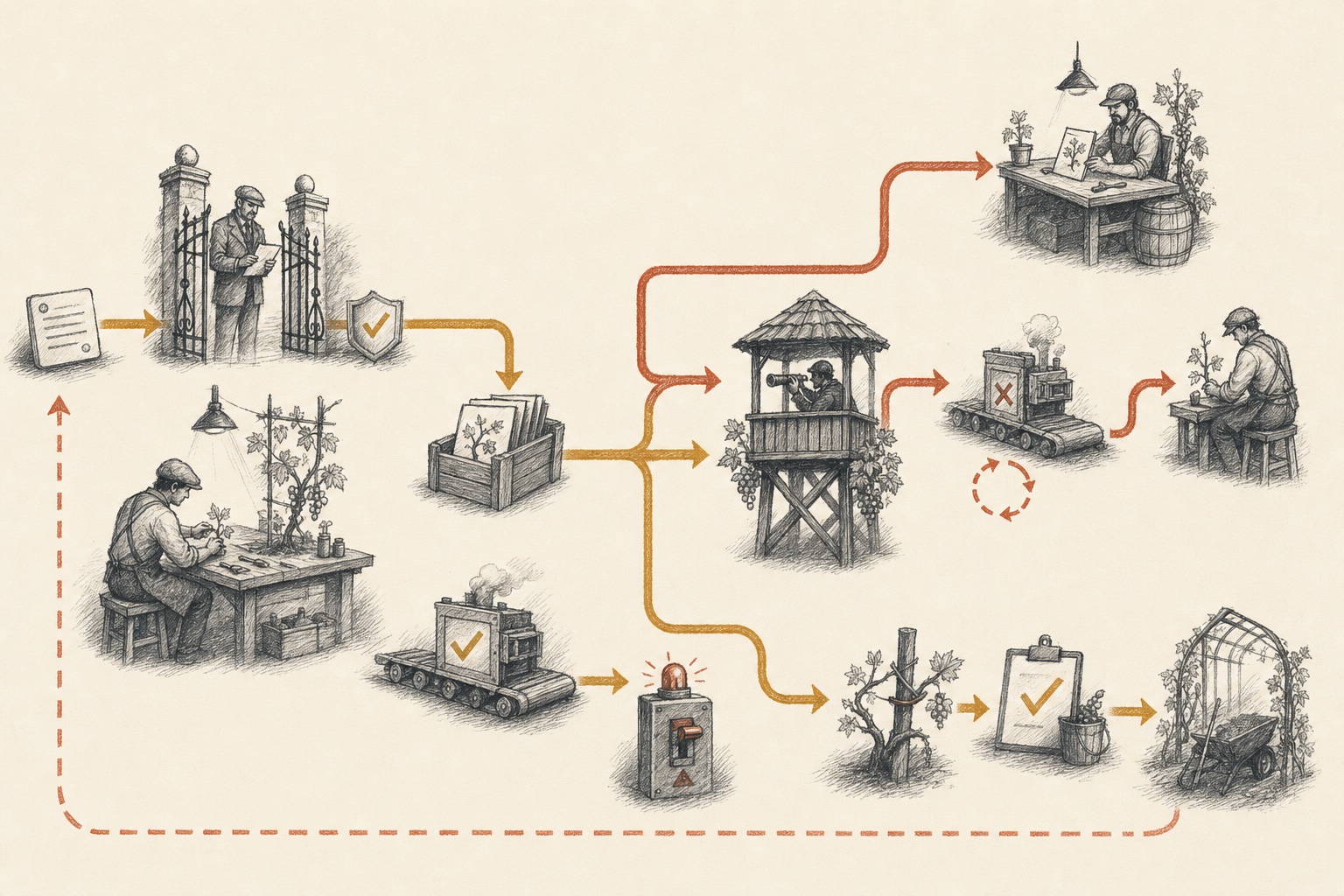
The loop — issue to MR
 Owner gate
Vendangeur
MR handoff
MR watcher
Review feedback
Pipeline retry
Circuit breaker
Merge · post-merge · reap
Owner gate
Vendangeur
MR handoff
MR watcher
Review feedback
Pipeline retry
Circuit breaker
Merge · post-merge · reap- Owner gate — assignment becomes work only after owner authorization.
- Vendangeur → MR handoff — the isolated worker implements and validates, then
track_mrtransfers care. - MR watcher — reviews and failed pipelines return to the worker; repeated failure reaches the circuit breaker.
- Merge · post-merge · reap — approval and green pipelines lead to merge, final monitoring, and deterministic cleanup.
| Stage | What happens |
|---|---|
| Detected | Watcher publishes issues_new |
| Spawned | Vendangeur created in its own git worktree, issue as context |
| In progress | Issue labelled in-progress |
| Working | The loop makes the change, validates it, and opens an MR |
| Tracked | The worker calls track_mr(mr: N) so the MR watcher takes over |
Comments on a tracked issue are forwarded to the conductor as issues_comment
events (Pinard’s own comments are filtered, so there’s no feedback loop).
The MR watcher
Once an MR is tracked (written to .state/mr-watcher.yaml, polled every ~30s), the
daemon tends it through its whole lifecycle:
Worker opens MR → track_mr → MR watcher
    ├── Review comments → forwarded to the worker (threaded via discussion_id)
    ├── Pipeline fails   → dispatched to the worker (attempt X/5)
    ├── Pipeline passes  → informational event to the conductor
    ├── Approved + green  → auto-merge (only if enabled — off by default)
    ├── Merged (human or auto) → post-merge pipeline + tag monitoring
    ├── Circuit breaker (5 failures) → worker killed
    └── Terminal condition → reapWorker (the single teardown point)
Review forwarding
New reviewer notes are published as review_comment events carrying
discussion_id (for threaded replies) and file/line (for inline comments), and
dispatched straight to the worker’s inbox — including the exact
glab api …/discussions/<id>/notes command to reply in-thread.
Automated maître review (auto_review)
When CI goes green on a non-draft MR, the daemon notifies the owning maître (the
parcelle conductor) to review the diff and post a signed comment. This is on by
default — auto_review: true — and is independent of auto-merge.
The maître uses aoc pressoir get-pr-changes to enumerate changed files and posts a
review comment signed 🍇 Reviewed by the <parcelle> maître. Reviews are
idempotent: a new review only fires when the MR HEAD SHA changes (i.e. after a new
push). Trivial MRs (docs sync, image/chart bumps, reverts) are skipped automatically.
Pinard does not approve MRs automatically. Approval remains the human owner’s
or forge’s responsibility. aoc pressoir approve-pr is available as a manual CLI
tool for operators acting on explicit instruction only.
Opt out per-vigne or vignoble-wide with auto_review: false in vignes.yaml. See
MR Workflow for the full lifecycle, idempotency details,
and approval policy.
Auto-merge (optional)
Off by default — a human merges. When enabled via auto_merge: true in
vignes.yaml (per-vigne or global), the watcher merges once
all hold: pipeline success, at least one approval, no unresolved
threads, and not a Draft. If unapproved, a needs_approval event goes to the
conductor. With auto-merge off, none of this runs.
Post-merge & reap
After merge, the watcher monitors the main and tag pipelines (reporting to the
conductor), and finally calls reapWorker — the single, deterministic teardown
point that kills the tmux session and cleans up the worktree.
See also
- MR Workflow — full MR lifecycle: auto-review, approval policy, CI failures, post-merge monitoring.
- Authoring Processes — write your own loop.
- Orchestration & Parcelles — group SWE work into workstreams.
- Configuration —
auto_merge,auto_review, and other toggles. - Buddy Capsules — let a colleague fund a vendangeur’s quota.