Web Terminal
The web terminal is a browser view of a tmux session, reached through a link and streamed over NATS. It lets you watch — and, as the operator, optionally steer — an agent work without SSH access to the host, including agents running on remote/HPC machines. Views are read-only by default; operators get a control-room index of all their sessions and can opt into writable mode.
How it works
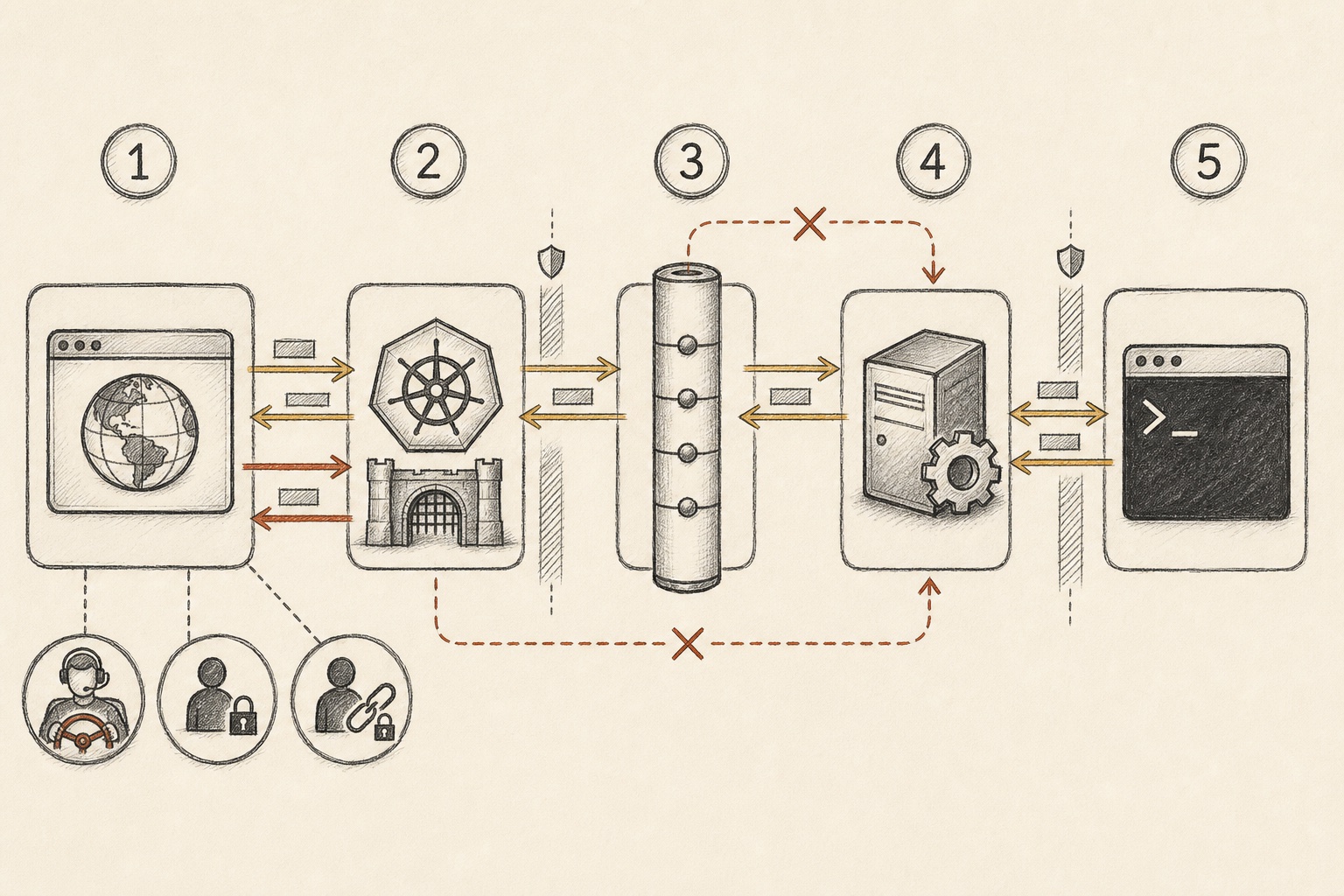
Terminal bytes are ephemeral, so they travel over core NATS, never JetStream:
 Browser
Gateway
Core NATS
Responder
tmux target
No inbound shortcut
Operator
Funder
Signed link
Browser
Gateway
Core NATS
Responder
tmux target
No inbound shortcut
Operator
Funder
Signed link- 1Browser — terminal viewer; read-only unless an entitled operator requests steer mode.
- 2Gateway — Kubernetes WebSocket bridge that authenticates the viewer and mints a scoped grant.
- 3Core NATS — ephemeral bidirectional terminal transport; JetStream is not used.
- 4Responder — validates the grant on the tmux host and owns the PTY lifecycle.
- 5tmux target — read-only attach by default; writable only for an entitled operator.
- 6Viewer roles — the three labels below the browser distinguish operator, capsule funder, and signed-link viewer; each carries different scopes and write privileges.
- Gateway — a Kubernetes service that serves the embedded xterm.js frontend and the WebSocket. It verifies the signed link, mints a short-lived grant, and bridges the browser to per-viewer NATS subjects in the requested vignoble’s namespace. No inbound connection to the tmux host is needed. One gateway serves all of your vignobles (see Multi-vignoble gateway).
- Responder — runs on every tmux host: in-process in the daemon on the Pinard host,
and via
aoc webterm-responderon standalone/HPC hosts. It verifies the gateway’s grant (including the vignoble), thentmux attach -r(read-only) through an embedded PTY and streams frames back with flow control. It tears the PTY down on disconnect, idle, or target exit. - Signed links —
…/sessions?v=<vignoble>&target=<target>&exp=<unix>&sig=<hmac>, where the signature is an HMAC over the vignoble, target, and expiry. The vignoble is bound into the signature, so a link for one vignoble cannot be replayed against another.
Getting a link
There are three ways to get a link:
aoc webterm-link --target <session> [--vignoble-name <v>]
--vignoble-name defaults to the resolved vignoble (NATS_VIGNOBLE); pass it explicitly
when generating links for a specific vignoble.
Add --auto to make the command suitable for automated callers: it prints nothing and
exits 0 when webterm or post_links is not configured, so scripts can invoke it
unconditionally and only append a link when one is returned.
From the conductor (régisseur/maître) TUI, the /webterm [name] slash command mints a
link for a vendangeur on demand — with no name it shows a picker of the active
vendangeurs.
Links can also be posted automatically onto MRs when webterm.post_links: true
(default off), once on first tracking. A link is only posted when a real vendangeur
session exists — tracking-only entries (e.g. aoc track-mr called without an active
worker) and cuvée MRs produce no link, because there is no live tmux session to stream:
- With SSO enabled — an unsigned link (
…/sessions?v=&target=) is posted. It carries no bearer credential, so it’s safe to advertise publicly: the gateway grants access only to the SSO-authenticated operator. - Without SSO (Phase 1) — the link is the signed, expiring form (below).
“Vendangeur attached” comment
When a vendangeur starts work it posts a “🧰 Vendangeur attached” note on the
driving issue/MR (session name, process, parcelle, run ID, start time). When
webterm.post_links: true the comment automatically appends a 🖥️ Live terminal link,
so reviewers can open the browser terminal immediately without generating a separate link.
This works even before aoc track-mr runs (i.e. before the MR is opened). The link
appears only when webterm is configured; if it is not, the comment posts as before without
the link.
Multi-vignoble gateway
The gateway serves a set of vignobles rather than a single one. One deployed gateway instance covers all of your vignobles — no redeploy when you add one.
The served set is determined as follows, in priority order:
- Explicit allowlist — set
WEBTERM_VIGNOBLES(comma-separated) on the gateway container, or configuregateway.vignoblesin the Helm chart values. Only the listed vignobles are served; all others get a403. - KV-derived (preferred, default) — when
WEBTERM_VIGNOBLESis unset or empty, the gateway serves any vignoble that has published an owner to thepinard-vignoblesNATS KV. The daemon publishes on startup, so new vignobles appear automatically without a gateway redeploy; vignobles with no live daemon/responder simply return “session not found” when a viewer tries to connect.
Per request, the gateway reads ?v=<vignoble> from the link, checks that the vignoble is
served, resolves the owner for that vignoble, and bridges the WebSocket to
pinard.<vignoble>.webterm.*. Operator authorization (preferred_username matching) is
also per-vignoble.
The responder verifies that a received grant is scoped to its own vignoble and silently rejects grants intended for a different namespace.
Authentication & authorization
With a webterm.auth block configured (Cognito issuer + client ID), the gateway runs the
OIDC login flow itself (Authorization Code + PKCE, public client), validates the ID token
against the pool’s JWKS, and stores a stateless signed session cookie. Without it, access
is signed-link-only.
Authorization is deny-by-default:
- Operator (the vignoble owner, matched on the token’s
preferred_username) → any target in that vignoble; writable on request. - Capsule funder (SSO-authenticated, matched to the worker’s contract funder) → that one target, always read-only (steer toggle hidden).
- Viewer (a valid signed link) → that one target in that vignoble, read-only.
- Everyone else → denied.
Funder access is automatic: when a funded capsule worker starts, Pinard records the funder’s
username in a NATS KV (pinard-capsule-funders). When the SSO-authenticated funder opens
the terminal URL, the gateway recognises them and grants read-only access without requiring
a separately issued signed link. They see a 🔒 capsule monitor (read-only) indicator
and no steer toggle.
The owner is discovered automatically from a NATS KV published from credentials.yaml;
there’s no manual user-to-vignoble mapping.
Writable “steer”
Views are read-only by default. An operator (never a scoped-link viewer) can opt into
writable mode via a toggle in the terminal header (?mode=rw). The gateway mints a
writable grant only for an operator who requested it, forwards browser keystrokes, and the
responder attaches without -r and writes input to the PTY — single-writer, gated on
the grant at both ends, and audited as mode=rw. Anyone without the entitlement silently
falls back to read-only.
Toggling the steer mode requires a full page reload: the writability grant is minted
by the gateway at WebSocket upgrade time (based on ?mode=rw in the URL). There is no
in-protocol way to upgrade or downgrade an existing connection without a new grant, so the
toggle triggers a reload rather than an inline switch.
Terminal header features
The terminal header shows the vignoble name, the session target, and the current mode (read-only / steer / capsule monitor). Two additional elements are present for every viewer:
- ⛔ Interrupt button — available to all viewers (read-only, steer, and funder).
Clicking it sends an interrupt signal to the agent’s NATS
…interruptsubject (the same channel used by the conductor’sinterrupt_workertool), cleanly cancelling the current turn without terminating the agent. This is safe because the signal goes through NATS, not a destructivetmux send-keys C-c. - Clickable issue link — when the worker was spawned from a GitLab issue, a
📋 #N link appears in the header pointing to the driving issue. The link is resolved
from the worker’s KV state (
PINARD_ISSUE_URLset at spawn time).
Control-room index
Opening the gateway with no target (/sessions) serves an authenticated,
operator-only two-pane control-room index:
- a sidebar of the vignobles you own, and
- for the selected vignoble, its live sessions — the régisseur, each maître window, and each vendangeur — enumerated over NATS in real time, each linking to a read-only terminal view.
Vendangeur rows are enriched with their parcelle and current state. Remote agents
(standalone/HPC workers not on the local tmux host) appear in the index as long as their
lastSeen timestamp is fresh (within 5 minutes) — and they are clickable links pointing
to a live terminal view served by the remote host’s responder (the 🌐 badge indicates a
self-served responder rather than the local daemon). A vignoble with no live local responder
still shows any recently-active remote workers from the KV; it degrades gracefully rather
than erroring. Scoped (signed-link) viewers never see the index — it’s operators only.
Configuration
The webterm: block in credentials.yaml holds base_url, the link/grant/cookie
secrets, TTLs, idle_timeout, max_viewers, post_links, and the auth: sub-block
(issuer, client_id, redirect_url, scopes, session_ttl). A gateway needs the
link, grant, and cookie secrets; a responder needs only the grant secret.
For Helm deployments, the served vignoble set can be configured via gateway.vignobles
in the chart values (leave it empty to use KV-derived auto-discovery).
Navigating windows without disturbing the operator
A window target (session:window, e.g. conductor:3) is viewed through a per-viewer
grouped session, so opening a régisseur or maître window doesn’t move the operator’s
active window; the grouped session is torn down with the viewer. Plain vendangeur sessions
attach directly.
aoc attach — local terminal streaming
For operators on the Pinard host (or any machine with NATS access), aoc attach
provides a direct local terminal view without opening a browser. It uses the
same grant-gated responder protocol as the web gateway — webterm.grant_secret must
be set in credentials.yaml.
aoc attach <session>               # stream by session name, agentId, or runId
aoc attach <session> --timeout 5m  # detach after 5 min idle
aoc attach <session> --steer       # writable steer mode (operator only)
The remote host must be running a responder (aoc webterm-responder or the in-process
daemon responder). Press Ctrl+C to detach — this sends a close signal so the
responder tears down the PTY immediately.
--steer opens the session in read-write mode, forwarding your local keystrokes to
the agent’s PTY. Like the browser steer mode, it is operator-only — the grant is
minted with ModeRW and the responder enforces it at both ends.
Diagnosing missing sessions (aoc webterm-doctor)
If a worker does not appear in the control-room index (/sessions), run:
aoc webterm-doctor                           # use the resolved vignoble
aoc webterm-doctor myproject                 # or pass the vignoble name directly
aoc webterm-doctor --vignoble-name myproject # or as a flag
webterm-doctor connects to NATS, reads all records from the pinard-agents KV bucket,
and prints per-agent include/exclude reasoning that mirrors the logic buildIndex uses
in the gateway. Output columns:
| Column | Meaning |
|---|---|
INCLUDE | Agent passes all checks and would appear in the index |
EXCLUDE | Agent fails a check; reason column explains why (vignoble mismatch, stale lastSeen, missing name, etc.) |
LOCAL | Agent is a local tmux session listed via tmux ls, not via the KV scan |
ERROR | KV read failed for this key |
Common exclude reasons: vignoble mismatch (the record belongs to a different vignoble),
stale: lastSeen=X ago (heartbeat older than 5 minutes), lastSeen absent (no heartbeat
ever received — check that the worker’s publishState is reaching NATS).
Keys that are deleted/tombstoned (normal worker teardown leaves a delete marker behind
until KV compaction runs) are skipped from the table rather than reported as ERROR; a
trailing (skipped N deleted/tombstoned keys) line shows how many were filtered.
Known limitations
Terminal traffic currently shares one NATS connection (a dedicated account for terminal traffic is a follow-up).